What this is: the implementation guide for my local LLM box, the hardware and the serving stack behind it. A retired Dell Precision T7910 workstation got two new CPUs and three used datacenter GPUs, then power, cooling, RAM, and software fights followed. The box now serves a 180B-parameter Qwen hybrid at 524,288 tokens of context across two 262K slots, and a 284B DeepSeek, both through llama.cpp.
Environment used here: Windows Server 2022 and Ubuntu on the same T7910, dual Xeon E5-2697A v4, three Tesla V100 32 GB (PG500-216, TCC mode), llama.cpp forks compiled from source against CUDA 12.8. Windows Server is the reference side and where both forks were first built; since 2026-09-08 production serving runs on the Ubuntu side of the dual boot, from
.shlaunchers under transient systemd units, with logs going to journald instead of a file. Where a figure came from one side and not the other, the text says which. Build window: about nine weeks, mid-June to September 2026.Verified here: the figures below come off this box at real context fill. Nothing is from a spec sheet, and nothing is a benchmark from someone else’s hardware. Where a figure is an estimate, it is labeled as one. Reference material I added from vendor documentation is labeled as reference, separate from what the machine reported. Where a table quotes a before-and-after pair, note that several changes landed in the same window, so read the pair as a direction rather than an isolated cause.
Placeholders: none needed, this records one specific machine. Your prices, part numbers, and results will differ. Substitute your own hardware and re-measure.
Follow it top to bottom, or hand it to an AI agent and let it work the phases (section 12). Three things this page names but does not ship, all of them covered in section 3: the two fork trees, the GGUF repacks, and the qwen-fixed-v22 chat template.
Notes repository (added 2026-10-05): the working notes for this rig are public at github.com/trappsquid/V100-Inference-notes: the platform notes, the measurement protocol, the per-model serving configurations, and the patch files the fork builds took. It is also the full version of the engine this box has moved to, the Strata lane, which the last section of this page introduces with its measured results.
0. Goal and acceptance
The goal was simple to state and slow to reach: run a 2026 flagship hybrid model well on a 2015 workstation with 2017 datacenter GPUs, on my own hardware, at a context length no rented instance made economical. The box runs the heavy agentic work, the long-context sessions and the tool calling. Small local models hallucinate tool results, so small models are not the daily driver on this box.
One working rule shaped everything and it comes up constantly: I measure everything on this box and do not trust numbers I did not measure myself. Every time I trusted a document instead of the machine, I got burned. The 64 GB RAM story in section 2 is the worst example.
Acceptance milestones from this box, at real context fill where stated:
| Milestone | Number |
|---|---|
| GPU3 cooling fix | 82 °C with throttle at 135-142 MHz (~11 t/s) to 36-39 °C at 1260 MHz, ~23 t/s restored |
| Qwen3.6-27B Q5_K_M, 1× V100 | 29.3 t/s baseline to 36.7 t/s with draft-mtp n3 (61% acceptance) |
| Qwen3.6-27B Q8_0, 2× V100 @224K | 48.9 t/s, 86% MTP acceptance |
| Tensor split vs layer split (Q8_0 27B, 2× V100 @110K) | 30.5/31.5 vs ~22 t/s, +40%; prefill 565 vs 518 |
| MTP n2 (Qwen3.8-27B) | 25.4 to 45.2 t/s (+78%) |
| F16 vs Q8_0 at 100K+ fill | 7.6 vs 30.5 t/s. F16 is half the speed. |
| DeepSeek IQ2, 2× V100 + RAM spill | 54.6 t/s prefill, 10.6-13.7 t/s decode |
| DeepSeek all-VRAM, 3× V100 @262K | 18-20 t/s at 90K+ fill |
| DeepSeek Q4_K + moe-cache (daily) | 12.52 t/s warm at 38K fill on the Windows build to 20.3 t/s warm on Ubuntu with --moe-cache 22528; DSpark drafter rejected (6.12 t/s, 15.3% acceptance) |
| DeepSeek q8_0 KV at depth (2026-09-12, Ubuntu build with the rotation fix) | 19.79 t/s warm, 17.60 at 37K fill, about +14% over f16 K; not promoted to the launcher until a needle test passes on that binary (section 5) |
| DeepSeek expert cache, 16384 to 22528 MiB | 11.35 t/s cold to 17.5 t/s; VRAM 29.4 GB per card, 3 GB headroom |
| DeepSeek configs that lost | ngram spec 9.11 t/s; expert pinning blk[0-3] 15.68 t/s; -ngl 41 + blk.42 exps=CUDA0 16.2 t/s; every NUMA variant within noise |
| DeepSeek moe-cache A/Bs | 24.8 to 37 t/s short-context at 99.9% acceptance; 13.6 to 14.2 at 90K fill; best 14.66 t/s at 98.5K |
| Qwen3.8-Flash-Next Q4_K_XL @262K | 11.47 t/s decode @113K real fill, 129.6 t/s prefill |
| Qwen3.8-Flash-Next IQ4_XS @524K (daily) | Loads and generates, 87.4 GiB / 96 GiB, 2 slots × 262,144; 35-36 t/s decode short context, 32.5-35.9 t/s flat at 37K fill, prefill 254 to 301 t/s; vision 42 t/s, 1,082 image tokens |
| Context records | 262,144 (Aug) to 524,288 (Sep 03) |
1. Parts and cost
Every part and what I paid for it. The chassis and the RAM are listed separately because the machine’s current state differs from how it arrived: the chassis shipped with the E5-2643v3s and 32 GB, the 2697A v4s went in later, and the Micron RDIMM lot is installed for 192 GB.
Used (eBay)
| Item | Cost |
|---|---|
| Dell Precision T7910 (E5-2643v3 @3.40 GHz, 32 GB, 512 GB SSD, Windows 11 Pro) | $432.21 |
| 2× Intel Xeon E5-2697A v4 SR2K1, 16-core 32-thread (as a set) | $64.93 |
| 3× NVIDIA/HP Tesla V100 PG500-216 32 GB HBM2 | $2,290.86 ($763.62 each) |
| NVIDIA Quadro P400 PCIe 2 GB, triple mini-DisplayPort low profile | $24.35 |
| Used subtotal | $2,812.35 |
New (Amazon)
| Item | Cost |
|---|---|
| HAOYEXIN PCIe 3.0 x16 right-angle riser cable (3rd V100, top of chassis) | $22.62 |
| 3× WINSINN DC 97 mm 12 V blower fan (9733, dual ball bearing, one per V100) | $45.21 ($15.07 each) |
| 3× 3D-printed blower adapter shroud (standard 97×33 blower) | $59.85 ($19.95 each) |
| 3× COMeap 8-pin CPU power adapter (Dell PCIe cable to V100 female) | $29.97 ($9.99 each) |
| Kingwin PCIe 1× to 16× riser card adapter with 6-pin power (P400 in a weak slot) | $12.99 |
| XMSJSIY SATA to 4× 3/4-pin fan power splitter (12 V to the V100 fans) | $10.80 |
| 3× Dell Precision T7910/T7610/T7600 power cable (8-to-8 pin, FP427) | $43.80 ($14.60 each) |
| New subtotal | $225.24 |
Memory upgrade (bought, install pending)
| Item | Cost |
|---|---|
| 12× Micron 16 GB 2Rx4 PC4-2400T ECC REG RDIMM (MTA36ASF2G72PZ-2G3BII) | $757.70 ($63.14 each) |
| Memory subtotal | $757.70 |
Total build cost
| Group | Cost |
|---|---|
| Used (eBay) | $2,812.35 |
| New (Amazon) | $225.24 |
| Memory upgrade | $757.70 |
| Grand total | $3,795.29 |
The chassis arrived with 32 GB (8×4 GB) and the E5-2643v3s. What it runs now is the 2697A pair, the three V100s, and 192 GB of RAM.
Reference: platform facts for the parts above. The T7910 takes one or two Intel Xeon E5-2600 v4 processors and has 16 DIMM slots, 8 per CPU (Dell Precision Tower 7000 Series 7910 spec sheet). The E5-2697A v4 is a 16-core, 32-thread Broadwell-EP part at 2.60 GHz base, 3.60 GHz turbo, 40 MB cache, 145 W TDP, DDR4-2400 memory support (Intel ARK). The Tesla V100 is Volta, 32 GB of HBM2 at 900 GB/s (NVIDIA product page, V100 datasheet).
2. Physical build
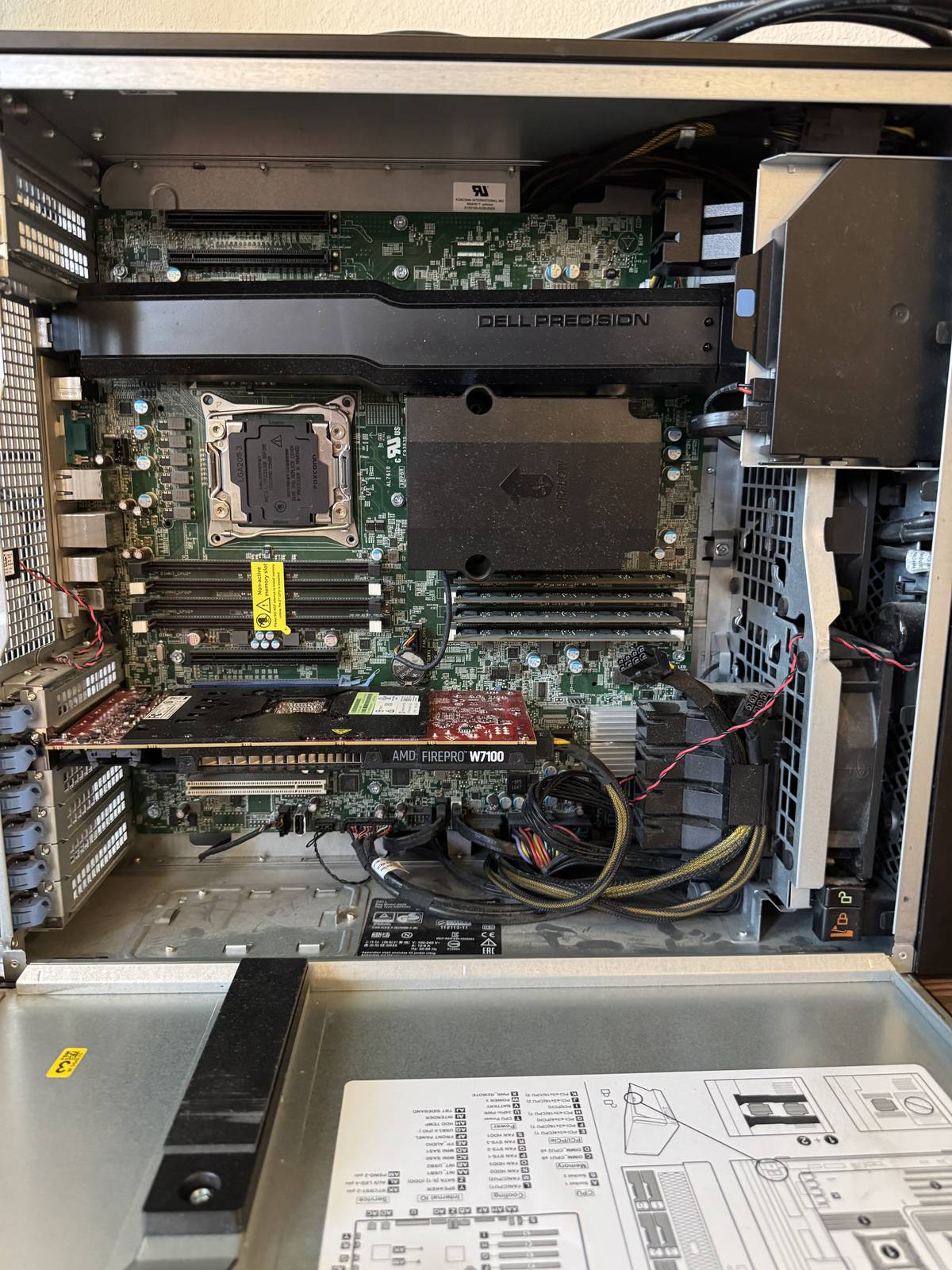
The T7910 as it arrived.
The T7910 is a dual-socket Broadwell-EP workstation: two E5-2697A v4s, 16 cores each, DDR4-2400, 16 DIMM slots across 4 channels per CPU, and 7 PCIe slots. It was never meant to be a GPU server. It has the slots and the CPUs, and it keeps running, which is enough.
| Item | What it is | Notes |
|---|---|---|
| GPUs | 3× Tesla V100 32 GB (PG500-216, TCC mode) | 96 GB VRAM. The reason for the build. |
| Display GPU | Quadro P400 2 GB | Not allowed to run inference |
| CPUs | 2× Xeon E5-2697A v4 | Shipped with E5-2643v3s; I installed the 2697A pair |
| RAM | 192 GB DDR4 (12×16 GB Micron 2Rx4 @2400) | Trained at 2400 even at 2 DIMMs per channel; memtest86+ still pending. See the RAM section below. |
| Boot | 476 GB LSI RAID volume (C:) | |
| Model drive | 1 TB Crucial MX500 (E:) | The GGUF files live here |
| Spare | Micron 1100 1 TB | Wiped, waiting for an Ubuntu install |
What the box serves right now:
- Qwen3.8-Flash-Next, a 180B-parameter hybrid MoE, at 524,288 tokens of context across two 262K slots. The model uses 87.4 GiB of the 96 GiB of VRAM. It has vision support, an OpenAI-compatible API on port 8081, and an OpenWebUI front end.
- DeepSeek-V4-Flash-0731 Q4_K, a 284B MoE with 13B active, with its routed experts on CPU and an expert-output cache. Both get explained in section 6.
Slot layout
The box started with two V100s plus the P400. Adding the third V100 meant moving the P400 out of its original slot on CPU1, a real x16 slot, and down to the lowest bus slot so the V100 could take the good one.
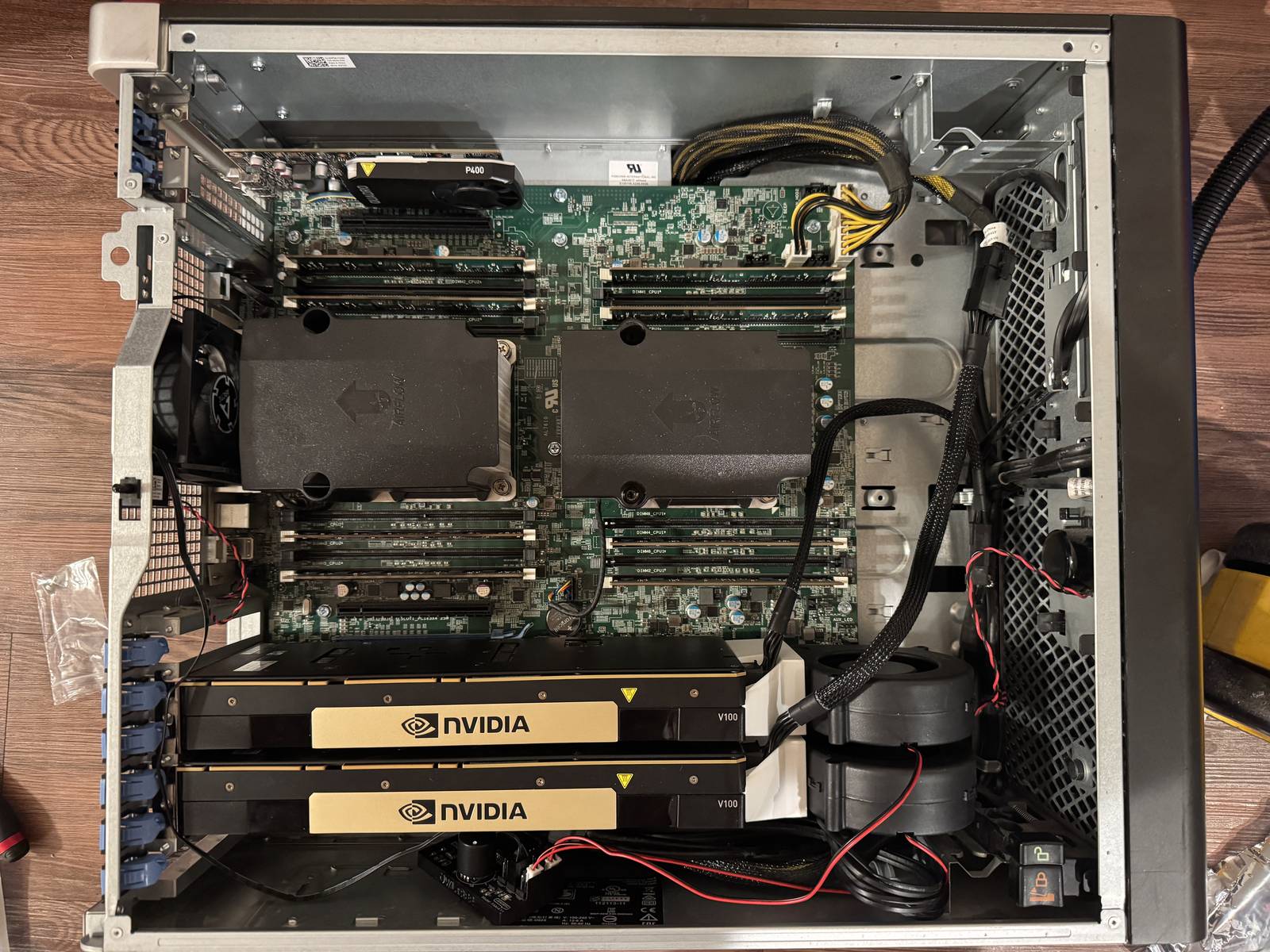
The original layout: two V100s and the P400.
- V100 #1 and #2 on CPU0 (03:00.0, 04:00.0)
- V100 #3 on CPU1 (A1:00.0), on a right-angle riser to reach the top of the chassis
- P400 at 02:00.0
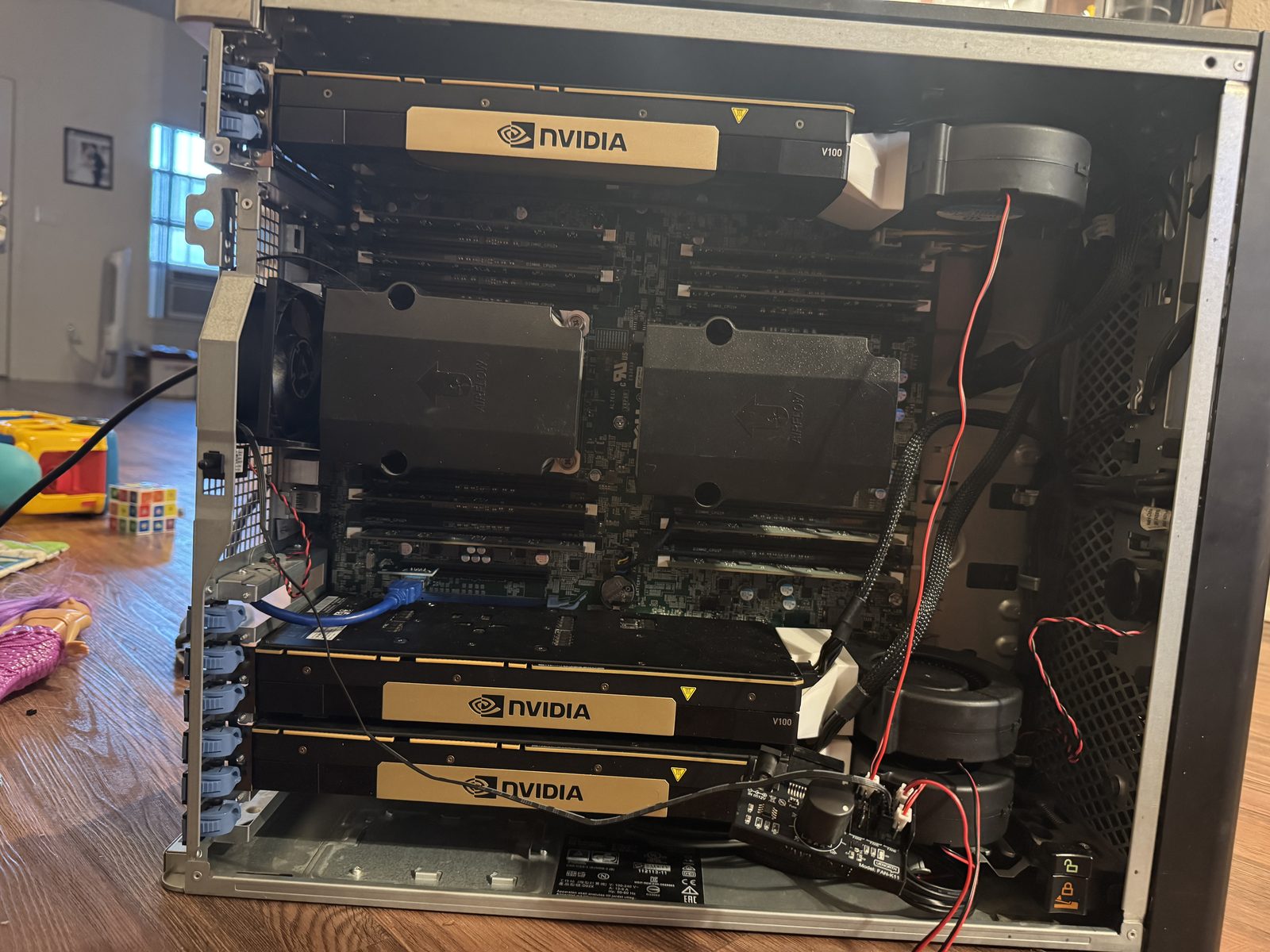
Final layout: third V100 in, the P400 relocated.
That last layout caused a subtle problem. Because of how CUDA enumerates devices, the P400 sometimes shows up as CUDA device 0 in nvidia-smi. Keep that in mind. It bites later.
Two checks are mandatory every time you add or move a GPU:
- Re-check
nvidia-smiindices. The display GPU quietly re-includes itself after any re-enumeration. - Run
llama-server --list-devicesbefore writing any launcher. Windows re-enumerates PCIe on boot. Cards land on new paths or leave phantom devices behind. Those are harmless and removable withpnputil /remove-device.
Power wiring: EPS, not PCIe
The T7910’s mainboard power is a proprietary 28-pin connector plus two 8-pin EPS for the CPUs. The Dell PSU has no 24-pin ATX connector at all. It plugs edge-on into a power distribution board. That shaped every power decision.
V100s take EPS 8-pin, not PCIe 8-pin. Same connector family, different pinout. EPS is the CPU power wiring standard, and Tesla wired their cards for it. Forcing a PCIe-wired cable into an EPS-wired socket puts 12 V and ground on the wrong pins, which can kill the card. The T7910’s own GPU power cables are Dell’s pinout too, so each V100 gets a Dell FP427 8-to-8 cable adapted to the card with a COMeap 8-pin CPU adapter, one per card, which is exactly what the parts list in section 1 shows.
One cable per card. Never split one EPS connector between two V100s. Two cards can pull about 500 W sustained against a 432 W connector rating.
SATA adapters are for fans, not GPUs. The blower fans run off a SATA-to-fan splitter and get away with it because they pull a few watts. SATA power adapters are not a power delivery strategy. GPU power comes from dedicated Dell FP427 cables adapted with the COMeap CPU adapters, one per card.
The stock Dell 1300W PSU feeds the board plus the three V100s through these cables, and it has been solid. The 4-GPU plan in section 11 is where the power situation gets interesting.
Cooling: the 82-degree fix
The third V100 is a passive-heatsink Tesla. Datacenter cards assume a wall of chassis airflow. A workstation assumes its GPUs have fans. Card #3 sat at the top-right of the chassis, the worst airflow spot in the case, and for weeks I never noticed, because short OpenWebUI sessions never heated it up.
Then I started running sustained agent workloads, and the problem showed up. GPU3 idled at 82 °C pulling about 54 W. During decode it sat in software thermal slowdown, SM clock pinned at 135 to 142 MHz against a 1380 MHz maximum. A three-way layer split that should have decoded around 23 t/s was crawling at about 11 t/s. The GPU was not broken. It was overheating, and I had not measured it under load.
The fix was mechanical: put a blower fan on GPU3 identical to the ones already on GPUs 1 and 2. Each V100 wears a WINSINN 9733 97 mm blower on a 3D-printed adapter shroud that seats the blower against the card’s heatsink, and the fans draw 12 V from a SATA power connector through a fan-power splitter. Results, verified with nvidia-smi under real load across all three cards:
- Idle: 82 °C down to 36-39 °C on all three V100s
- SM clock: 135-142 MHz throttled up to 1260 MHz, no throttle events
The lesson generalizes. A passive datacenter card in a workstation chassis is fine until you measure it under sustained load. Idle temps and short benchmarks hid this for weeks.
RAM: the doc said 64 GB. The board had 32 GB.
Every planning document for the DeepSeek-V4-Flash runs assumed 64 GB of RAM. It said so in writing. When I finally enumerated the DIMMs with Win32_PhysicalMemory: 8× 4 GB Hynix 1Rx4 @2400, 32 GB total. The doc was wrong, the board was half empty, and RAM was the thing gating the 284B-class models I wanted to run.
Broadwell-EP memory rules, for anyone speccing the same upgrade:
- 1 DIMM per channel (8 sticks or fewer) runs at 2400 MT/s
- Two DIMMs per channel usually drops the socket to 2133. This board trained the 12-stick set at 2400 anyway, measured; memtest86+ is still pending.
- 32 GB sticks were priced out, so 16 GB 2Rx4 PC4-2400T ECC RDIMM is the part to buy
- 8× 16 GB gives 128 GB @ 2400; 12× gives 192 GB (what I run, trained at 2400); 16× gives 256 GB
I bought a 12-stick lot of Micron 16 GB 2400T (the MTA36ASF2G72PZ-2G3BII part in section 1). The plan was to install 8 for 128 GB at 2400 and keep 4 as tested spares, but the box benefits from the full set, so all 12 are in: 192 GB at 2400.
One stick in the lot was dead, with an amber light. The diagnostic routine, learned over several evenings:
- “Worked before, won’t POST after a failed upgrade” usually means sticky memory training. Power drain, CMOS battery out, hold the power button 15 to 60 seconds, wait, then let it retrain for 2 to 3 minutes. Do not interrupt training.
- Move the suspect stick into a known-good occupied slot. That separates a dead stick from a dead slot.
- Booting one stick on a CPU2 with no memory of its own is valid (UPI forwarding). Never a POST blocker.
- A CMOS clear resets BIOS fan settings to Auto. Set them back after.
- Slot map: DIMM1-4 per CPU are the slots that get exercised. DIMM5-8 are invisible until populated. A dead secondary slot hides until you need it.
Drives: inventory before you delete
The worst day of the project produced a standing rule. On 08-29, about 88 GB got deleted while the intended target drive sat empty, because I had not inventoried the drives first. The rule since then, which has saved me twice: inventory every drive before deleting anything, and run an orphan audit. The spare Micron 1100 was health-checked before its wipe (25 power-on hours, 0% wear, no read errors), which is how a spare should be retired from duty.
3. Software: the Volta problem and the source builds
Read this section before you buy anything: it decides which GPUs and runtimes are viable.
The V100 is sm_70, and the industry has been dropping Volta support for two years. The state of support:
- vLLM is dead on Volta. v0.20+ dropped sm_70 entirely (
SM70 (Volta) is deprecated). The last usable version is 0.18.x, and even that loses to llama.cpp for single-user work. The reason: vLLM’s speed on quantized models comes from fast quantized-math kernels (Marlin, GPTQ-AWQ) that require Ampere or newer. Without them it falls back to slow paths and FP16 weights only, with no speculative decoding and no native Windows build. - TensorRT-LLM needs sm_80 or newer. Classic TensorRT needs sm_75 or newer. EXL2 needs Turing or newer. All dead on Volta.
- CUDA 13 removed Maxwell, Pascal, and Volta from the toolchain. PyTorch cu128 and cu129 wheels dropped sm_70. cu126 is the last PyTorch line that supports it. CUDA 12.8 still compiles for sm_70, which is what I build with.
- MXFP4 native kernels are Blackwell-only. On a V100, anything 4-bit goes through the DP4A fallback.
llama.cpp is the only actively maintained engine that still supports Volta. That is the reason this project exists at all. But it has two consequences.
First, prebuilt binaries do not include sm_70. The official release zips ship sm_86 and sm_89 only. On a V100 they fail with failed to load model even though the CUDA backend loads fine, which sends you debugging in the wrong direction. Every build on this box, roughly a dozen of them, was compiled from source with -DCMAKE_CUDA_ARCHITECTURES=70. I use official prebuilts everywhere else. On Volta there is no choice.
Second, Windows versus Linux barely matters for this workload. For fully offloaded, GPU-bound llama.cpp on TCC-mode Teslas, the difference is 0 to 3 percent. The big Linux wins, 10 to 25 percent, only show up in CPU-bound partial-offload and WSL2 setups. I stayed on Windows Server for most of the build because this is a daily driver that launches from a visible desktop .bat window. The Ubuntu side of the dual boot went in for a different reason: some engines other than llama.cpp refuse sm_70 on Windows entirely. Since 2026-09-08 it is also where the dailies are served. Both forks were ported to Linux, and every number in sections 5 and 6 dated from then on is an Ubuntu number: the launchers are .sh files run as transient systemd units (systemd-run --unit=qwenfn), and the server log goes to journald rather than to a file, which is journalctl -u <unit> instead of tail.
Reference: the support timeline is documented on the vendor side. NVIDIA’s CUDA release notes record the removal of Maxwell, Pascal, and Volta from the toolkit (CUDA Toolkit Release Notes). PyTorch’s CUDA support table lists Volta (7.0) only under the CUDA 12.6.3 wheels, while the cu128 and cu129 lines list Turing and newer; the sm70 deprecation RFC directs Volta users to the cu126 wheels (PyTorch RFC #172352, PyTorch dev-discuss on architecture support). vLLM’s current installation docs require NVIDIA compute capability 7.5 or higher and document no native Windows support (vLLM GPU install docs). The exact 0.18.x to 0.20.x boundary is my own finding on this box; vLLM’s docs do not version it.
The build command
Shared build fingerprint across all forks: Release, Ninja, MSVC 14.44, CUDA 12.8, GGML_CUDA=ON, CMAKE_CUDA_ARCHITECTURES=70, GGML_NATIVE=OFF, GGML_CPU_ALL_VARIANTS=OFF. The qwen4exp build also sets GGML_CUDA_FA_ALL_QUANTS=ON.
cmake -B build -G Ninja -DGGML_CUDA=ON -DCMAKE_CUDA_ARCHITECTURES=70 -DCMAKE_BUILD_TYPE=Release -DGGML_NATIVE=OFF
Reference: llama.cpp’s build docs cover this. By default a build targets the GPU attached at build time, so builds for other machines need an explicit architecture list, and GGML_NATIVE=OFF is the documented way to get a portable binary (llama.cpp docs/build.md). The docs and ggml’s CUDA CMake both use CMAKE_CUDA_ARCHITECTURES; that is the variable this build sets. There is no GGML_CUDA_ARCHITECTURES in either tree, so a build that sets that name gets CMake’s default architecture list and silently misses sm_70. GGML_CUDA_FORCE_MMQ is defined in the same CMake file (ggml CUDA CMakeLists.txt).
Three patches that made modern models load
Getting 2026’s FP4 and MXFP4-heavy models to run on 2017 silicon took three separate fixes. The DeepSeek build needs all three. The Qwen build needs none of them.
GGML_CUDA_FORCE_MMQ=ON. Routes quantized GEMMs, MXFP4 and friends, to the DP4A path instead of cuBLAS tensor-ops. FixesCUBLAS_STATUS_NOT_SUPPORTEDon batch 64+ quantized GEMMs.- A source patch in
ggml-cuda.cu: changeCUBLAS_GEMM_DEFAULT_TENSOR_OPtoCUBLAS_GEMM_DEFAULTat all three call sites. F16 dense GEMMs still crashed during big prefills. DEFAULT lets cuBLAS pick a kernel that works. GGML_CUDA_GRAPHS=OFF. CUDA graphs pre-record a sequence of GPU operations so they can be replayed without CPU overhead, but the recording itself allocates memory up front, andcudaGraphInstantiateruns out of memory after single prefills longer than about 23K tokens. Turning graphs off trades a little launch overhead for prefills that actually finish.
These are set at cmake time or in the source, not in the launcher. The one exception: the moecache fork also reads GGML_CUDA_FORCE_MMQ and GGML_CUDA_GRAPHS as environment variables at startup, which is why its launcher in section 5 carries both lines. The qwen4exp build sets its flags at build time only.
The fork zoo
Upstream llama.cpp moves slower than model architectures do, so the box accumulated a pile of source builds, each with one job. A MoE-cache fork is the workhorse on the DeepSeek path. The qwen4exp build handles Qwen3.8-Flash-Next with the MTP graph wired in, which took a small patch stack on top of the fork: one upstream change rolled back, one pulled in.
Two build-discipline rules keep the pile from eating itself:
- CUDA DLL discipline. Fork builds often ship no CUDA DLLs in
bin/. Copycublas64_12.dll,cublasLt64_12.dll, andcudart64_12.dllfrom a known-good build, or every launch dies instantly. - Never build while the server runs. The exe is locked on Windows. Build into a separate directory, kill the server, copy the DLLs, re-point the desktop bat.
Not shipped with this post. The fork trees, the repacks, and the template are still not published as downloads, so treat them as work rather than downloads. The patch work is published: the notes repository (V100-Inference-notes) carries the patch files the fork builds took, next to the platform notes, the measurement protocol and the per-model serving configurations, and it keeps moving as I keep testing:
| Artifact | What it is | Where you start |
|---|---|---|
llama-cpp-qwen4exp-v2-mtp | llama.cpp fork with the MTP graph wired in, at HEAD f65b746ef | upstream llama.cpp plus the patch list above |
llama-cpp-ds4-next | the leloch moe-cache-v2-pr branch merged onto upstream master (about b10759) | that branch, then the three patches above |
Qwen3.8-Flash-Next-Uncensored.IQ4_XS.gguf, mtp-...-Q4_K_M.gguf | the Qwen daily and its MTP head | the model’s own release page |
DeepSeek-V4-Flash-Q4_K-0731-abliterated.gguf | the DeepSeek daily, 164.6 GB | the repack’s release page |
qwen-fixed-v22 Jinja template | the chat template that fixes the 15 upstream bugs | section 7 item 5 describes the fix; the file is on this box |
The forks are local trees with local patches, which is why section 3 gives you the build fingerprint, the three patches, and the DLL discipline instead of a clone command. Rebuild from upstream and re-apply; do not expect a tarball.
At one point I deleted about 930 GB of stale build trees and old models, leaving one serving build and one model. What made it safe: move the runtime dependencies into the surviving tree and patch the launcher before deleting anything, then verify the server after.
4. Model acquisition: downloading 100+ GB files without corrupting them
Big model pulls are routine, and each of these rules comes from a specific failure:
- Use aria2c, but on HuggingFace Xet-backed repos it must run single-connection (
-x 1 -s 1 --file-allocation=none). Multi-connection eats 403s and 416s mid-download and can leave a file that looks byte-perfect but is corrupt. Multi-connection is fine on non-Xet repos with retries on. If ETA inflates more than 5× while connections drop, kill it and restart. It does not self-heal. - Getting 403s with the default user agent: send a browser User-Agent header.
- Never put two URLs in one aria2c invocation. The last
-owins globally, and segments get sized against the first file’s Content-Length. hf_hub_downloadwith the Xet backend is the reliable path: about 165 GB/h sustained, 52 GB in roughly 20 minutes. Xet stages into.cacheand renames on completion, so the target dir shows nothing until each file finishes. Poll the.incompleteblobs.- Verification is a hash, not a size. SHA-256 against the HF LFS OID is definitive. A GGUF header parse plus byte size is not enough, because a corrupted tail passes both. Downloaders have exited 0 with shards still partial, so check for live processes and growing blobs before you trust it.
- Grep the binary for architecture support before committing to a 50 GB download. GGUF v2 versus v3 matters for build compatibility.
Reference: HuggingFace documents Xet-backed downloads and hf_xet, the chunked content-addressable backend that huggingface_hub enables by default for repos that use it, including the .cache staging behavior (huggingface_hub download guide). GGUF is a self-describing format: the file carries its metadata and architecture, which is exactly why grepping it before a big pull works. The format history is in the spec, where v2 widened counts to 64-bit and v3 added big-endian support (ggml GGUF spec).
5. Serving: the two daily launchers
Two launchers, one box. One server at a time on :8081, --alias main, --host 0.0.0.0. Both builds are source-compiled: Release, Ninja, MSVC 14.44, CUDA 12.8, GGML_CUDA=ON, CMAKE_CUDA_ARCHITECTURES=70, GGML_NATIVE=OFF.
Reference: the llama-server flag reference below matches these launchers: --split-mode (tensor mode is marked EXPERIMENTAL there), -ot/--override-tensor, -ctk/-ctv, --cpu-moe, --load-mode, --fit, and -dev (llama-server(1) man page). On DeepSeek-V4 the K cache has to be f16 on builds from before 2026-07-07, where q8_0 K corrupts the output (section 5). Speculative decoding types and knobs are documented in llama.cpp’s speculative decoding page, including the comma-separated type list and the draft-mtp, draft-dspark, and ngram-mod types (llama.cpp docs/speculative.md). The mtp- and mmproj- file names in the launchers follow the GGUF sidecar naming convention (ggml GGUF spec).
The Qwen 524K MTP daily (qwen4exp)
The current daily, the one that set the 524K record. Binary at C:\llama-cpp-qwen4exp-v2-mtp\build\bin\llama-server.exe, fork tree llama-cpp-qwen4exp-v2-mtp at HEAD f65b746ef (2026-08-29). Model Qwen3.8-Flash-Next-Uncensored.IQ4_XS.gguf (92 GB / 98.4 GB decimal, GGUF v3, arch qwen4exp), draft mtp-Qwen3.8-Flash-Next-Q4_K_M.gguf (2.44 GiB / 2.62 GB, native MTP heads), vision mmproj-f16 (863 MB).
@echo off
title Qwen3.8-Flash-Next UNCENSORED IQ4_XS - 524K MTP DAILY (8081)
echo ==================================================
echo  v2-mtp build: #28123 rollback + #28023 + MTP graph
echo  IQ4_XS 98.4GB + mtp-Q4_K_M draft (2.62GB)
echo  524K total ctx - 2 slots x 262144 each - draft-mtp n3
echo  p-min 0.75, -devd pinned
echo  VERIFIED 09-03: loads + generates @524K
echo ==================================================
echo.

cd /d C:\llama-cpp-qwen4exp-v2-mtp\build\bin

set CUDA_VISIBLE_DEVICES=
set LLAMA_ATTN_ROT_DISABLE=1

llama-server.exe ^
  -m "E:\models\Qwen3.8-Flash-Next-Uncensored\Qwen3.8-Flash-Next-Uncensored.IQ4_XS.gguf" ^
  -md "E:\models\Qwen3.8-Flash-Next-Uncensored\mtp-Qwen3.8-Flash-Next-Q4_K_M.gguf" ^
  --mmproj "E:\models\Qwen3.8-Flash-Next-Uncensored\Qwen3.8-Flash-Next-Uncensored.mmproj-f16.gguf" ^
  --image-min-tokens 1024 ^
  --alias main ^
  --host 0.0.0.0 ^
  --port 8081 ^
  -dev CUDA0,CUDA1,CUDA2 ^
  -devd CUDA0,CUDA1,CUDA2 ^
  -ngld 999 ^
  --split-mode layer ^
  --load-mode none ^
  --no-host ^
  --fit off ^
  -ot "per_layer_token_embd.weight=CPU,v\.blk\..*=CUDA2" ^
  --flash-attn on ^
  -ctk q8_0 -ctv q8_0 ^
  -c 524288 ^
  -np 2 ^
  --spec-type draft-mtp ^
  --spec-draft-n-max 3 ^
  --spec-draft-p-min 0.75 ^
  --reasoning on --reasoning-effort low --reasoning-preserve ^
  --reasoning-budget 16384 ^
  --reasoning-budget-message "Reasoning budget exceeded. Stop thinking and answer now." ^
  --reasoning-format deepseek

echo.
echo Server exited with code %errorlevel%
pause
Line by line: the device env is cleared (poison prevention, section 7). -dev is explicit on all three V100s. The draft device is pinned with -devd, which keeps the draft heads off the P400; without it, CUDA’s enumeration can hand the draft context to the 2 GB display card and the launch dies. -ngld 999 offloads all draft layers. --fit off is paired with -ot overrides, because they abort together otherwise; the PLE embedding table is parked on CPU and vision blocks are pinned to CUDA2. q8_0 KV both directions. Flash attention on. --host 0.0.0.0, because loopback-only broke OpenWebUI once. The MTP draft head at n-max 3 with p-min 0.75, per the knobs in section 6. The reasoning budget with its “stop thinking” message, because an unbudgeted run once went 30 minutes without answering. And a visible window with a version banner, so I always know what is running.
The reasoning settings took three passes, which is worth the paragraph because the failure modes are not obvious. Only xhigh, medium, and low are valid values. Effort is a token-count knob, not a speed knob: an A/B on the live server put decode at 45.39 t/s on xhigh against 46.17 on medium, identical inside noise. What it changes is how many thinking tokens precede the answer, so it costs wall clock on hard prompts and nothing per token. xhigh made the model overthink everything, spending its thinking on trivia, so it went down. Budget 4000 was the next failure: raising effort put a single image read (1,024 image tokens minimum, and that is before the model says anything about it) past the budget, so the analysis died mid-think and no answer came back. 16384 covers an image plus reasoning. The setting that is live now is low with budget 16384: it still reasons (about 32 characters of reasoning on a trivial question) and decode is unchanged at 36.5 t/s. Raise the budget before you raise the effort.
Note (the template flag belongs on this line). This launcher also carries
--jinja --chat-template-file, pointing at the qwen-fixed-v22 template from
section 7. It is not optional on a Qwen build: without it the official
template’s thinking-on default applies and the reasoning flags above end up
fighting a template that ignores them. Keep the flag on every Qwen launcher
and keep the template file next to the build on disk. Reload the server after
you touch either.
The DeepSeek Q4_K daily (ds4-next)
Designed for long autonomous runs. Binary at C:\llama-cpp-ds4-next\build\bin\llama-server.exe, fork tree llama-cpp-ds4-next: the leloch moe-cache-v2-pr branch merged onto upstream master (about b10759, 2026-08-31). Model DeepSeek-V4-Flash-Q4_K-0731-abliterated.gguf (164.6 GB / 153.3 GiB, GGUF v3, arch deepseek4). The 10.9 GB DSpark drafter sits next to it on disk, unused: it was measured on this box and lost (section 6).
@echo off
REM V4-Flash abliterated Q4_K daily config (np2 x 262K, f16 KV; q8 K is garbage on pre-2026-07-07 builds)
cd /d C:\llama-cpp-ds4-next\build\bin
llama-server.exe -m "E:\models\DeepSeek-V4-Flash-0731\abliterated-Q4_K\DeepSeek-V4-Flash-Q4_K-0731-abliterated.gguf" --alias main -c 524288 -np 2 --host 0.0.0.0 --port 8081 -dev CUDA0,CUDA1,CUDA2 -ngl 999 -ot "exps=CPU" -b 4096 -ub 4096 -t 16 -tb 16 -ctk f16 -ctv f16 --flash-attn on --moe-cache 22528
pause
The routed experts (about 158 GB) stay mmap’d on CPU through -ot "exps=CPU"; the shared expert, router, attention, and auxiliary tensors stay on the GPUs. Two slots of 262,144 tokens each. The expert cache pool is 22 GiB per device (22,528 MiB), the setting that took decode from 11.35 t/s cold to 17.5 t/s and 20.3 t/s warm over a 16,384 MiB pool. It leaves VRAM at 29.4 GB per card with about 3 GB of headroom, which is the budget you are spending when you reach for a larger pool.
Note (f16 K, and the version boundary underneath it): --cache-type-k f16 is what the launcher above ships, and on DeepSeek-V4 it is mandatory on builds from before 2026-07-07. With q8_0 K those builds emit confident gibberish behind a healthy /health (upstream llama.cpp #25382; their test grid at temperature 0 shows the break is on the K side only: f16 K with q8_0 V is correct, q8_0 K is garbage on CPU and CUDA alike). The mechanism is worth knowing because it explains where the boundary sits. A quantized K cache enables the Hadamard incoherence rotation; a non-null self_k_rot diverts every DeepSeek-V4 layer off its trained sparse CSA/HCA/lightning-indexer attention into build_raw_attention, and that fallback applies the rotation with a plain ggml_mul_mat instead of the block-reshaping ggml_mul_mat_aux and never un-rotates the MLA V output. It is a graph-level bug, so it reproduces identically on CPU and CUDA. Upstream fixed it on 2026-07-07, and the shape of the fix is worth knowing because it decides what you can do with a quantized K cache. The merge that landed is #25202 llama: fix quantized kv-cache for dsv4, which makes DSV4’s compressed CSA and HCA caches respect the Hadamard rotation, so quantized-K layers stay on their trained sparse paths instead of being diverted off them. The competing patch, #25391, took the blunter route and was closed without merging nine minutes before: turn the rotation off for the whole LLM_ARCH_DEEPSEEK4 arch. That switch survives as an env var, LLAMA_ATTN_ROT_DISABLE=1, and it is also the switch the Qwen launcher above carries for an unrelated reason. Mermiges/llama.cpp ds4-volta-fix / ds4-rotation-aware is the same approach as the merged fix (rotation-aware attention, not rotation disabled), kept as a branch.
The trap is that the broken path benches faster. q8_0 K measured about 14 percent ahead of f16 at depth on this box, and that ladder is where the failure turned up. The version boundary is the other place people go wrong: a later report that quantized KV still produced garbage (#26423, 2026-08-02) was retracted by its own author three days later, because he had two build trees on the machine and the gibberish came from the older one that predated the fix. The version string he quoted was the commit he had checked out, not what his binary was built from. A version string is not a binary. Compare the build, not the number.
On a build after 2026-07-07 the equation changes: upstream’s own retest came out coherent at 14.3 t/s with q8_0 KV, and 15.3 t/s with the rotation-disable change in place, so after the fix q8_0 K is a real speed option rather than a trap. The 2026-09-12 rung on this box’s Ubuntu build, which carries the fix, measured 19.79 t/s warm and 17.60 at 37K fill against f16. It is deliberately not in the launcher above: no needle test on that exact binary is recorded, and the rule at the end of this note is the reason. Any change to KV type on this architecture is a quality change, so the acceptance check is a needle test at depth, never a tokens-per-second number.
Note (DSpark): the native DSpark drafter was tested on this box and did not pay: 6.12 t/s against a 12.52 baseline, 15.3% acceptance. The drafter overhead on sm_70 kernels ate the gain. The published +55% numbers came from 4x3090 and B200 systems; this was the first V100 datapoint. It is not in the production launcher. A CPU-side drafter (--cpu-moe-draft) is the only variant worth revisiting, and only after the cheaper wins.
6. Measurement: the physics of fast inference on old cards
Every config decision in this build comes down to one equation, verified over and over:
Decode speed ceiling = single-GPU HBM bandwidth / total weight bytes.
A V100’s HBM2 gives you about 900 GB/s per card (NVIDIA V100 datasheet). Whatever you force that bus to read per token sets your speed. Everything else follows from that.
Layer split is a relay race
Splitting a model across two GPUs by layers means GPU0 computes its half of the layers, hands off to GPU1, and waits. Only one GPU works at any instant. nvidia-smi shows alternating 100/0 and 0/100, which is expected. The two HBM2 pools never add together. Consequences:
- A model that fits on one card gets slower when you split it. Measured on a 17.9 GB Q4: 51.6 t/s single-card versus 38.6 split at short context; 29.9 versus 21.1 at 62K fill; speculative draft acceptance 62% versus 34.5%.
- F16 is a trap on V100. An F16 27B model decodes at about 7.6 t/s at 100K+ fill, versus 30.5 t/s for Q8_0. Half the speed, because it is bound by HBM2 bandwidth and F16 doubles the bytes. Q8_0 GGUF is the right format for Volta: full quality, about 82% of the bandwidth ceiling. BF16 does not even run natively on sm_70. There is no bf16 hardware, so raw BF16 gets converted in-kernel per layer.
- Custom quants get no custom kernels. A repack labeled “K_P” reads to llama.cpp as generic Q4_K, so it runs on the generic kernels and hit only about 64% of the bandwidth ceiling in my testing. Do not predict speed from a quant’s file size. Benchmark it.
The one multi-GPU speedup that works is --split-mode tensor (build b10545 or newer). On Qwen3.8-27B Q8_0 across 2× V100 at 110K real fill: 30.5/31.5 t/s versus about 22 t/s for layer split, a 40% gain, with prefill at 565 versus 518. The reason it helps specifically at deep fill: at long context, decode spends more and more of its time re-reading the KV cache, which grows with context while the weights do not. Tensor mode splits the KV cache across cards, so each card reads half as much KV per token. The longer the context, the more that matters. One caveat: on 3 devices it hits an AllReduce power-of-2 assert unless your build has the upstream fix. My current fork does not, so the 3-card rig runs layer split. The flag reference marks tensor mode EXPERIMENTAL (llama-server(1)), and on this box it is also architecture-limited, which is the next paragraph.
Hybrid architectures change the KV math
Modern hybrid models (Qwen’s Gated-DeltaNet lines) made KV cache nearly free. On Qwen3.6-27B, only 16 of 64 layers are real gated attention carrying KV. The other 48 are recurrent linear-attention blocks holding a constant-size state, about 12 MB total, no matter how long the context gets. Measured KV cost came out to about 35 KB per token at q8_0, versus the roughly 150 KB per token you’d budget if you assumed every layer carried KV. Full native 262K context cost about a gigabyte.
The rule for every hybrid since: count only the full-attention layers when budgeting KV. This is why the 524K record later cost about 7.5 GiB instead of doubling.
The flip side: recurrent layers cannot be tensor-parallelized. Tensor parallelism splits the work inside each token’s forward pass across cards. A recurrent layer has nothing independent to split, because its state at token N depends on every token before it. --split-mode row crashes at load on every build I tested. Hybrids are layer-split or nothing. MoE hybrids doubly so, since they have both experts and SSM layers.
Speculative decoding
Volta decode is bandwidth-bound, so anything that avoids decoding one token at a time is worth real money. The mechanism in one paragraph: a much cheaper drafter, either a small separate model or a small draft head baked into the main model, guesses the next few tokens. The big model then checks the whole guess in a single forward pass, which costs the same as generating one token, and keeps the longest prefix that matches what it would have said. One read of the weights produces several tokens instead of one. The two knobs are how many tokens the drafter proposes per step (n-max) and how confident the model has to be to keep a drafted token (p-min). The health metric is acceptance rate: what fraction of drafted tokens survive verification. Healthy is 70 to 95%.
The options, in order of how much they’ve mattered on this box:
- MTP (baked-in multi-token-prediction heads). The heads ship inside the GGUF, no separate draft model needed. On Qwen3.6-27B it was +25% (n3, 61% acceptance). On Qwen3.8-27B it was +78% (25.4 to 45.2 t/s with n2). On bandwidth-bound Volta, MTP is a requirement, not a bonus.
- DSpark drafter. DeepSeek-V4-Flash’s native fast path, a separate small GGUF loaded with
--spec-type draft-dspark. It is the one item on this list that did not pay off. Measured on this box: 6.12 t/s against a 12.52 t/s baseline, 15.3% acceptance, net-negative. The drafter overhead on sm_70 generic kernels eats the gain. The +55% numbers circulating for DSpark came from 4x3090 and B200 systems. The architecture string also has to match exactly, or you getunknown model architectureat load. - Separate draft GGUFs and MTP head injection. When a model has no baked-in heads, you can run a small assistant model as the drafter, and when a model’s MTP variant is gated you can merge the standalone
mtp-head/*.gguftensors into the open no-MTP trunk with gguf-py. I’ve done that surgery more than once. - MoE cache compression (
--moe-cache). On a MoE model, only a handful of experts fire per token, and long agentic runs hit the same experts over and over. This fork caches expert outputs so repeated expert calls skip the compute. It is the biggest single win on the DeepSeek path: 6.41 t/s with the cache off to 12.52 t/s warm. - ngram methods. Model-agnostic and they work, but they hurt general chat quality. Fine for chat models, wrong for everything else. On the DeepSeek path ngram regressed outright: 9.11 t/s against a 19.79 t/s baseline, because the draft and verify overhead beat the acceptance gain. That is the useful shape of the result: a drafter only pays when its acceptance rate is high enough to cover a fixed per-step cost, and on sm_70 generic kernels that cost is large.
- The sleep-idle VRAM leak. MTP draft context does not get freed on
--sleep-idle-secondscycles and accumulates until OOM. Fixed upstream but not in my forks, so MTP launchers never carry the sleep flag.
Reference: llama.cpp documents the speculative decoding types used here, the comma-separated mixing of types (an earlier DeepSeek run mixed draft-dspark,ngram-mod; the production launcher carries no speculative decoding), the --spec-draft-n-max and --spec-draft-p-min knobs, and the acceptance-rate statistics the server prints (llama.cpp docs/speculative.md). The DSpark module is part of the official DeepSeek release: the model card notes that DeepSeek-V4-Flash-0731 shares its structure with the DSpark variant, meaning a speculative module ships attached (DeepSeek-V4-Flash-0731 model card).
The ladders that did not pay
Three more config families were benched on the DeepSeek path at real fill and all three lost. They are here so you do not spend the evenings:
| Change | Result | Why it lost |
|---|---|---|
| ngram speculative decoding | 9.11 t/s | draft and verify overhead above the acceptance gain |
expert pinning, blk[0-3] experts pinned to VRAM | 15.68 t/s | it displaces the expert cache and gives back more than the pin saves |
-ngl 41 with blk.42 exps=CUDA0 (one layer of experts on the card) | 16.2 t/s | adds a CPU dense-layer bottleneck to every token |
NUMA is a no-op on this box. Four variants were benched (baseline, cpunodebind=0, cpunodebind=1, node 0 with -tb 24, node 0 with -ub 2048) and all of them landed inside run-to-run noise: prefill 16 / 36 / 100 t/s at 135 / 475 / 1,845 tokens. The reason sits in the model. It is 164 GB across two sockets that have 96 GB each, so it splits about 51/49 and any CPU binding forces half the expert pages to be fetched from the far node over QPI, while leaving threads unpinned lets the scheduler float them toward whichever page is hot. The “pin it to one CPU” trick from dense-model tuning assumes the working set fits in one socket’s memory. This one cannot, so the lever does not exist. What is left is raw DDR4 bandwidth. Keep -t 16 -tb 16 -ub 4096 unpinned.
Prefill was never the problem, and most quoted numbers for this model are not prefill. A figure like 16 t/s on this box is decode at depth, not prompt processing. Measured prefill on the same server, rising with prompt size rather than falling:
| Prompt size | prefill t/s |
|---|---|
| ~500 tokens | 34-47 |
| ~2K tokens | 62-68 |
| ~8K tokens | 86-115 |
| ~45K tokens | 106-122 sustained |
The page cache is a confounder between runs, and it is the one that costs an evening. When a model stops, its file pages stay resident in the page cache and starve the next model’s working set. Switching from a 52 GB Qwen to the 153 GiB DeepSeek working set left roughly 55.7 GiB of the old model still cached, which held DeepSeek at about 1 t/s until those pages were dropped and the new model was re-warmed. So: a tokens-per-second number taken right after a model switch is not a number about the model. Drop the old model’s pages (POSIX_FADV_DONTNEED on the stopped files, a short Python or vmtouch -e call does it) and re-warm before you believe anything.
Qwen does not decay at depth. DeepSeek does. The standout property of the 180B hybrid is that decode was flat across fill: 35-36 t/s at short context and 32.5-35.9 t/s at 37K real fill, no depth decay, because most of its layers are recurrent and its KV cost is nearly flat. DeepSeek-V4 in the experts-on-CPU configuration does the opposite: about 19.8 t/s warm at short context falling to 17.6 t/s at 37K, since every token in a long context re-reads a KV that keeps growing. Budget for that difference in any long-context plan; it is the reason the Qwen hybrid is the daily on this box.
The models that earned the slot
DeepSeek-V4-Flash-0731: the 284B that fits. The 284B/13B-active DeepSeek Flash was the defining model of the middle of the project: agentic depth, 1M native context, and a Q4-class quality ceiling because the official weights are FP4/FP8 mixed at source (MXFP4 experts, so Q5/Q6/Q8 on the experts is wasted bytes). Getting it onto this box happened in three stages, and the order matters:
- Stage one, two cards (64 GB VRAM): spill to RAM. At 64 GB of VRAM, only the roughly 91 GB IQ2-class quant fit, and only with surgical expert eviction:
--override-tensorregexes push just the expert tensors to RAM while attention stays on GPU. Never--n-cpu-moe, which evicts the wrong end of the model and starves GPU0. On 2× V100 plus RAM that ran 54.6 t/s prefill and 10.6 to 13.7 t/s decode. - Stage two, three cards: all-VRAM. The third V100 let the model live entirely on the cards: 262K context, q8_0 KV, 31.4/31.2/31.4 GiB per card, 18 to 20 t/s at real 90K+ fill. Two load failures taught the flags:
--cpu-moewants about 84 GB of pinned host RAM (I had 32), so drop it when the model fits in VRAM. And-fit onmust not be combined with-ngl; they abort together. - Stage three, the daily: Q4_K with the experts on CPU. The abliterated Q4_K repack is 164.6 GB (153.3 GiB), with the routed experts quantized Q4_K and the sensitive tensors kept at F16, Q8, or Q4_K as the recipe calls for. The 192 GB of RAM lets
-ot "exps=CPU"park the routed experts in host memory while attention and the shared expert stay on the GPUs. The DSpark drafter was tested here and dropped (6.12 t/s against 12.52, 15.3% acceptance). What stayed is--moe-cache 16384: best measured 12.52 t/s warm at 38K fill, which lands on the published 8×V100 number (12.9 t/s) for the same architecture.
Four rules that climb produced. They cost a load failure each, so they are worth more than the t/s figures above:
- Order is the method. Spill to RAM, then all-VRAM, then the experts on CPU. Each stage only works once the previous one is stable, so climb in that order rather than starting where you intend to finish.
- Never load what already fits.
--cpu-moewants about 84 GB of pinned host RAM. When the model fits on the cards, drop it. -fitand-nglare mutually exclusive. They abort together; pick one.- An MTP launcher never carries the sleep flag. MTP draft context is not
freed on
--sleep-idle-secondscycles and accumulates until the box OOMs. Fixed upstream, not in my forks.
The honest verdict, and which quant it applies to. On the 2-bit IQ2 runs, DeepSeek was not smarter than a Q8_0 27B dense for chat. 13B active at 2-bit is roughly half the clean compute of 27B dense at Q8. The model’s advantages (agentic depth, 1M context) only show up at Q3/Q4 quality, which is exactly why the Q4_K repack (164.6 GB / 153.3 GiB) became the daily once the 192 GB of RAM was in.
Also evaluated and rejected: GLM-5.3 (not viable on this hardware), a TensorSharp .NET engine (missing sm_70 flash-attention kernels even after a real rebuild; llama.cpp won 39.9 t/s versus OOM), and DwarfStar (good for sm_70 verification, rejected as an agent backend because small local models hallucinate tool results).
Reference: the official release pages for both daily architectures. Qwen’s card breaks the model down exactly as the launcher budgets it: 125B parameters with 6B activated per token, plus a 51B n-gram embedding and 4B of MTP, 48 layers in repeating Gated-DeltaNet and MoE blocks, 512 experts with 10 routed plus 1 shared, and 262,144 native context (Qwen3.8-Flash-Next model card). DeepSeek’s card covers the 0731 release, its DSpark speculative module, and the million-token context framing (DeepSeek-V4-Flash-0731 model card).
Qwen3.8-Flash-Next: 180B on 96 GB, the current daily. This architecture is strange in a good way. 180B total: a 125B transformer with only 6B active per token, plus a 51B n-gram PLE (per-layer token embeddings in a 20M-row hash table, a RAM/disk structure touched every token), plus 4B of MTP. 48 layers in repeating Gated-DeltaNet/MoE blocks with sparse attention. MoE with 512 experts, 10 routed plus 1 shared. Native context 262,144.
The first attempt failed for a misleading reason. The Q4_K_XL quant loaded (86.3 GiB across three cards) and prefilled to 112,640 tokens, 86% of the way, before a CUDA OOM that needed just 1.6 GB more. A workaround that parked experts died at 24K on a pinned-allocation failure. The entire crash chain turned out to be the CUDA_VISIBLE_DEVICES device-map bug (section 7). With the env var gone: Q4_K_XL at 262K survives 113K fills at 11.47 t/s decode and 129.6 t/s prefill. The 262K launcher went live.
Then, on 09-03, the record. The v2-mtp build, the one with the MTP graph finally wired into decode, loaded the IQ4_XS 92 GB (98.4 GB decimal) file with a Q4_K_M MTP draft head (2.44 GiB / 2.62 GB) at -c 524288, two slots of 262,144 each, and generated. Idle VRAM: 87.4 GiB of 96 GiB. Doubling 262K to 524K cost only about 7.5 GiB because of the architecture: of 48 layers, only every fourth (12 layers) carries real KV plus the indexer cache. The other 36 are SSM-recurrent with fixed state that does not scale with context. On a dense model this would have been impossible.
The 262K launcher was retired the same day.
House standards
Settled early, never overturned:
- Quant floor: Q8-tier for dense quality, Q5_K_M as the absolute floor. No AWQ, nothing sub-Q8 for anything that needs to be good. The point is output quality; a quant that benches well and answers badly is a bad quant.
- KV cache: q8_0 floor, with one exception. q4_0 KV was a single-card compromise; the quality loss compounds with context length and long-context retrieval fails first. On DeepSeek-V4, f16 K is mandatory on builds from before 2026-07-07, the window in which q8_0 K corrupts the output (section 5).
- Benchmarks lie at short context. Report tokens/sec at real context fill (90K+), never short-context warm-cache. A short-context number on this hardware can be off by 2×.
- Uncensored or nothing. Every daily-driver model on this box is an abliterated or otherwise uncensored repack.
7. Windows CUDA problems you will also have
Collected in one place so they cost you hours instead of days:
- The
LLAMA_ARG_DEVICEpoison. llama.cpp parsesLLAMA_ARG_*env vars before CLI args, and an emptyLLAMA_ARG_DEVICEmakes every launcher in every new cmd window abort instantly. The symptom: all models crash identically from .bat double-clicks while working fine from a clean shell. It looks exactly like a global hardware failure. Fix:reg delete HKCU\Environment /v LLAMA_ARG_DEVICE /f. Prevention is now absolute: neversetxanyLLAMA_ARG_*. Pass-dev CUDA0,...in the .bat. CUDA_VISIBLE_DEVICESbreaks the qwen4exp device map. That build enumerates devices in its own order (V100s by PCI ascending, P400 last), so settingCUDA_VISIBLE_DEVICES=1,2,3re-maps the ordinals and the P400 sneaks in while a V100 gets dropped, giving an instant 38 GB allocation OOM. On that build, never set the variable. Bare-dev CUDA0,CUDA1,CUDA2already picks the three V100s. Verify with-lv 4. This was the root cause of the entire 180B crash chain.- Zombie CUDA processes. Killed processes can hold VRAM without appearing in tasklist. nvidia-smi shows phantom compute PIDs. Fix:
wmic process where processid=<pid> delete, and reboot if that fails. - The stale-server trap. “Cannot load the model” from a launcher means check for a stale llama-server holding the port or VRAM first. Always
taskkill /F /IM llama-server.exeby image name, never by wrapper PID. That burned me twice: a shell wrapper survived a “kill” and kept serving a benchmark. - Chat template bugs. The official Qwen chat templates were buggy. I catalogued 15 distinct bugs, including agentic stalling (an empty think block made the model behave as if reasoning had already happened), KV cache invalidation, 80% throughput drops from deep Jinja nesting, and tool-call crashes. The fix was the community qwen-fixed-v22 Jinja template, passed via
--jinja --chat-template-file, mandatory on every Qwen launcher. The subtlest bug: llama.cpp’s C++ Qwen handler hardcodesenable_thinking=trueinto the template variables, which makes the template’selse falsefallback dead code. Fixed by hardcoding{%- set enable_thinking = false %}and re-enabling thinking per request. Restart the server after template edits.
8. Day-2 operations
- Launch: double-click the desktop .bat. Always a visible cmd window, never a hidden background process.
- Stop: a kill bat that taskkills by image name. One port, 8081, one model server at a time. Never parallel test instances.
- Two sides, one port. Windows launches from the
.bat; Ubuntu launches the same flags from a.shfile undersystemd-run --unit=<name>, which is also how you stop it (systemctl stop <name>frees port 8081 and all three V100s) and read its log (journalctl -u <name> -f). It is one machine, so only one side runs at a time. - Benchmarks:
llama-benchsets baselines only; it has no speculative decoding flags. Real MTP numbers come from the server API: launch with--spec-type draft-mtp, time/v1/chat/completions, and checkdraft_n_acceptedagainstdraft_n. 70 to 95% is the healthy band. Report at real fill. - Health checks: never use
/v1/completionsto verify a template-configured server. It bypasses the Jinja template entirely, so template fixes silently vanish and raw<think>blocks leak out. Use/v1/chat/completionsonly.
Defending the configs from other AIs
A recurring problem with running this project alongside AI assistants: other AI sessions have edited my launchers and fabricated binary paths, inflated benchmark numbers by 40 to 50%, and written broken flags. The contamination checklist is now permanent:
- binary path must be the fork’s
build\bin - thread counts sane for the box
- flash-attn present (q4 V-cache segfaults without it on some forks)
- MTP never added to models without MTP layers (
failed to create MTP contextis fatal at load, and probing it on the production server is forbidden for exactly that reason) - context sizes within the VRAM budget with 3+ GB of headroom
9. Verification battery
Run these against the live box after any change. Most of these caught a real regression at least once during the build window:
| Check | What it proves | Result |
|---|---|---|
llama-server --list-devices shows three V100s, P400 last | device map sane before launch | PASS |
/v1/models name matches the launcher; GPU memory per card near budget | the running process matches the bat | PASS (87.4 GiB / 96 GiB at 524K) |
Chat completion returns no raw <think> preamble | qwen-fixed-v22 live, thinking off by default | PASS |
draft_n_accepted / draft_n over a real 90K+ fill run | acceptance in the 70-95% band | PASS on the MTP runs (61% and 86%); DSpark failed the check at 15.3% and was dropped |
taskkill /F /IM llama-server.exe then relaunch | clean stop, no zombie VRAM, port free | PASS |
| SHA-256 of daily files against the HF LFS OID | no corrupted download tails | PASS |
| Needle-retrieval question against a 30K+ fill, after any KV or quant change | the model still reads its context instead of only decoding fast | PASS at f16 K; the q8_0 K config failed it on a pre-2026-07-07 build (section 5) |
| Thermal re-check under sustained agent load | throttle events gone | PASS (36-39 °C idle, 1260 MHz) |
10. Avoid My Mistakes
- The planning doc said 64 GB of RAM. The board had 32. Check the machine with Win32_PhysicalMemory before you size anything.
- Idle temps and short benchmarks hid an 82 °C throttle for weeks. Measure under the load you will actually run.
- Deleted about 88 GB while the target drive sat empty. Inventory every drive before deleting anything, and run an orphan audit.
- SATA power adapters are for fans, not GPUs. GPU power comes from dedicated EPS-wired cables, one per card.
- An empty
LLAMA_ARG_DEVICEfrom a setx made every launcher abort. NeversetxanyLLAMA_ARG_*; pass-devin the bat. CUDA_VISIBLE_DEVICES=1,2,3dropped a V100 and admitted the P400. An instant 38 GB OOM that looked like a hardware failure. It was the root cause of the whole 180B crash chain.- Killing a wrapper PID, not the image. The stale server survived and kept serving a benchmark. Twice.
- MTP on a model with no MTP layers is fatal at load (
failed to create MTP context). Never probe it on the production server. - Two URLs in one aria2c call, or trusting a byte size over a hash. The last
-owins globally; verification is SHA-256 against the LFS OID or it did not happen. /v1/completionsfor template checks. It bypasses Jinja, so template fixes silently vanish and raw think blocks leak out.- Building while the server runs. The exe is locked on Windows. Build into a separate directory, kill the server, copy the DLLs, re-point the bat.
11. What’s next
- RAM and the Q4_K daily: done. All 12 sticks are in for 192 GB at 2400, and the DeepSeek-V4-Flash Q4_K (164.6 GB / 153.3 GiB) is the current daily with the routed experts on CPU. memtest86+ on the 12-stick set is still pending.
- The 4-GPU transplant. The T7910 chassis physically maxes out at 3 double-slot Teslas: 7 slot positions, and a 4th card needs bracket widths that don’t exist. The plan is to pull the board and mount it flat, slots up, in a custom 8020 aluminum tray or a Thermaltake Core X9 cube, with 4 V100s on shielded PCIe 3.0 x16 riser cables. Flat mounting is forced by the geometry: PCIe riser ribbons only bend in one plane, so in a normal tower the cards end up parallel to the board with their intakes pointed at the side panel. Mounted flat, the cards stand on edge with their intake edges facing the front fan wall, and the T7910’s own front fan module and blower shrouds transfer over. Power: the Dell 1300W keeps the board plus 2 GPUs, and a second SFX-L 850W runs the other 2, triggered by a 12 V relay module. A plain dual-PSU sync board cannot work here because it taps the main PSU’s 24-pin standby and PS_ON lines, and the Dell PSU has no 24-pin. One rule from the mining world applies: a GPU and its riser draw from the same PSU. End state: 128 GB VRAM and a freed slot for NVMe. The architecture is decided; the riser, relay, and PSU parts are not picked yet.
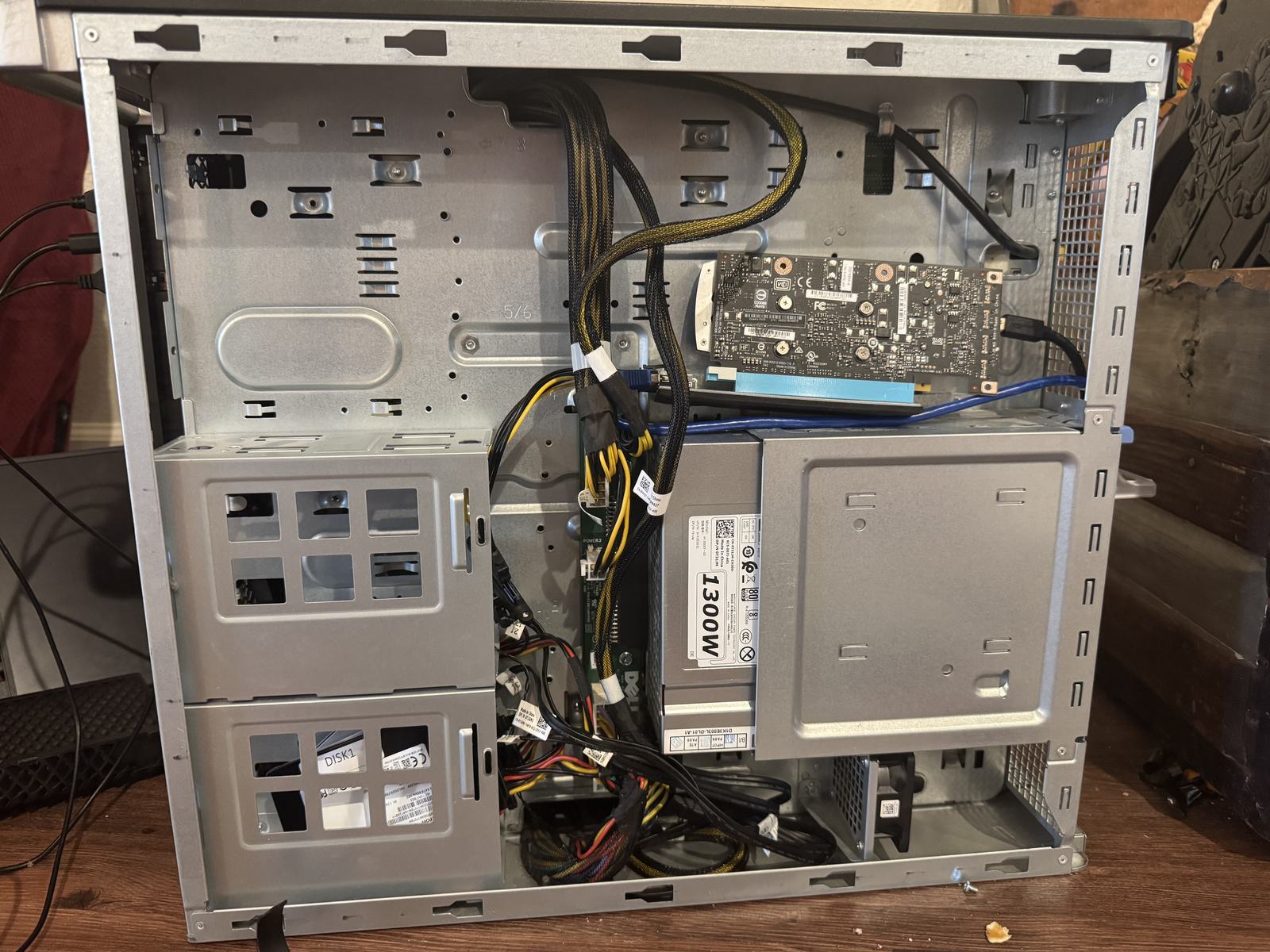
Headroom for a fourth V100.
- Ubuntu dual-boot: done, and now the serving side. It went in on the spare drive for the engines that refuse Volta on Windows, and since 2026-09-08 the dailies run there, from
.shlaunchers under transient systemd units with logs in journald. The Windows side stays as the reference build and the parity target: the.batfiles are what the Linux flags get compared against.
Strata: the engine this box runs now (added 2026-10-05)
The forks above are what this page documents, and they are no longer what this box serves. In October 2026 I moved the Qwen3.8-Flash-Next lane to Strata (Niko1221/Strata), an engine written for that architecture: MoE experts live across VRAM and host RAM, and the model’s 51B-parameter PLE n-gram table streams from SSD a few rows per token. OpenAI- and Anthropic-compatible APIs, an optional image encoder, and MTP speculative decode using the model’s own draft head. Volta runs through the engine’s experimental build path on CUDA 12.x, because CUDA 13 dropped sm_70. One model at a time on the same port, same three cards, same power budget. Nothing elsewhere on this page about wiring, cooling, RAM, downloads, or measurement stopped being true when the engine changed.
Measured on this box, fills stated with every figure rather than averaged, on engine v0.1.39:
| Model / quant | Expert residency | Decode @ short | Decode @ long | Prompt read | Spec accept |
|---|---|---|---|---|---|
| GSQ-RCO IQ3_XXS, all-resident | 100% | 77.6 @2.0k | 73.9 @17k | 656 -> 1,158 t/s | 76-80% |
| Uncensored IQ4_XS, all-resident | 100% | 85.3-86.8 @2.5k | ~82 @18k | 707 -> 1,772 t/s | ~76% |
| Abliterated Q8_0, 6 shards, deliberate spill | 67% (16,450 of 24,576) | 72.5-73.8 @2.4k | 66.0-66.2 @20k | 458 -> 1,578 t/s | 74-78% |
Both depths in every row are steady-state runs that passed the fresh-evaluation check below, not warm-cache repeats. For scale, the llama.cpp fork’s production lane for the same model family on the same cards runs 55.15 t/s @2.4k and 48.90 @19.5k, with prefill at 339-425 t/s. Strata’s prompt read is 1.9 to 4.2 times that, and its decode is above the fork’s at every depth measured. Two batch slots on the all-resident IQ3_XXS split measured 37-41 t/s per stream, 75-82 t/s aggregate, at 100% expert-cache hit. Vision passed a red-circle smoke test in 1.3 to 3.4 seconds. Boot is 50-60 seconds all-resident and 3 to 5 minutes on the first fill of the larger single-file and sharded layouts.
How those numbers were tested
Every arm obeys the measurement discipline this page has used throughout, which matters more with a third engine in the house, because a new engine is a new chance to fool yourself:
- Fresh evaluation, or the arm is void. Each arm starts a fresh process with the prior instance stopped. The server reports prompt-eval and eval token counts per request, and a valid arm shows
evalequal to the fill. A prefix-cache hit shows up aseval << fill, and that arm is discarded rather than explained. - A control on the same binary, in the same session. No speculative arm is compared against a baseline measured on another day or another build.
- Speculation judged token-weighted on production-like traffic. Probe-style arms showed gains that washed out on a real token mix more than once here, so a probe result is a lead, not a number.
- The output is read, not just the rate. Coherence failures (repetition, truncation) do not appear in tokens per second, and the full flag set is logged with every figure or the figure is not reproducible.
Three tests did the real work:
- The spill test, and the control that makes it mean something. The Q8_0 row is a deliberate spill condition: its experts (~120 GiB) exceed the ~75 GiB three-card budget, so the engine filled 16,450 of 24,576 expert slots and served the rest from RAM and disk. Expert-cache hit measured 99.1-99.3% with about 0.0% fetched over PCIe, because the profile-ranked fill captured the hot set, and the decode delta against the all-resident run (-15% / -19%) is the quant’s roughly doubled expert bytes rather than spill I/O. The control is what earns that claim: the same model under a 49% residency cap hit 92.9% and lost 13.7%, so spill costs something only when the working set actually rotates.
- The PLE read path. That 28.8 to 54.4 GB table is read randomly, a few rows per token, from SSD, so the read mode is not a detail. Default unbuffered row-sized reads on a dedicated I/O thread against mmap, A/B on the 54.4 GB table: 73.8 / 66.2 t/s decode at 2.4k / 20k fill against 40.2 / 48.4, and 5.2 seconds to first token against 18.1. mmap faults synchronously on the token thread. The default stays.
- The encoding, checked against the source of record. Per-row relative L2 error against the checkpoint’s BF16 table: Q8_0 0.53%, FP8 2.66%, IQ4_NL 7.59%. Q8_0 is the closest readable encoding rather than merely the one that boots, and the encoding is a fidelity choice rather than a speed lever: FP8 measured 2 to 4% ahead of IQ4_NL on an upstream rig, and a full BF16 table moved nothing outside noise.
Patches. Stock v0.1.39 refused both tables this box runs: split-shard metadata validation and Q8_0 PLE rows each needed a local fix, and both are in the notes repository. Budget a patch and rebuild cycle for a new quant family, because the format gates arrive in sequence.
Where it does not go. Locking the whole PLE table in RAM does not fit this box: about 47 GiB free with the engine resident against a 54.4 GB table. Q6_K expert layers are not in the engine’s format lists, so boot refuses and names the layer. Multi-GPU Linux was untested upstream at v0.1.39, with reports invited, though the two- and three-card configurations here work as shipped.
The full playbook, the flags behind each row above, and the table as it stands now are in the notes repository; this page keeps the snapshot.
Threat model
This box serves a model over HTTP and the post tells you to hand an agent shell access to it. Both are worth a paragraph before you copy any of it.
What the guardrails stop. The serving model has no authentication and no
tools of its own; it answers prompts and nothing else. Loops are split explicitly
across cards with -dev, so a bad layer assignment fails at launch instead of
thrashing. Downloads are hash-verified before they are loaded, and stale build
trees are removed only after the launcher is re-pointed, which keeps a rollback
possible. Section 8’s contamination checklist plus a stopped-server test is the
gate an agent’s change has to pass, and that gate is the only reason a
fabricated binary path or an inflated benchmark stops at the door.
What they cannot stop. Four things. --host 0.0.0.0 is in the launcher
above and it is there for a reason, but it means the model answers anyone who
can reach the port: no key, no token, no per-user limit, and a prompt queue you
share with whoever else finds it. Queue depth and memory are your only rate
limit. The models on this box are abliterated repacks served without a filter,
so their output is theirs, not a policy. The forks are unmerged branches with
local patches, which means no upstream security fixes arrive by themselves and
you are the maintainer. And an agent with shell access can edit the launchers,
the downloads, and the checklists it is supposed to be measured against, so the
verification has to live outside the thing being verified.
Minimum hardening. Keep the serving port on the LAN and never forward it; if a client needs remote access, put an authenticated proxy in front rather than exposing llama-server. Run the agent as a dedicated account that cannot write to the model or build directories. Keep the model directories and the launchers in separate trees so a prompt-side compromise is not a code-side one. Hash-verify every download and keep the hashes somewhere the agent cannot rewrite. Snapshot the launchers before any change, and treat every benchmark number as suspect until you have run it yourself at the stated fill.
12. Hand it to an agent
This guide is structured so an AI agent can execute parts of it. Point an agent with shell access at this page and have it work the phases in order, reporting after each one: parts (section 1), physical checks (section 2), source builds (section 3), downloads (section 4), then the verification battery in section 9. Agents are good at the mechanical phases: downloads, cmake runs, benchmarks, hash checks. Two phases are yours before an agent can do anything: producing the fork trees and the repacks (section 3’s table names what each one is), and placing the chat template. Budget that as your work, not the agent’s.
Two hard rules for this box:
- Agents never edit the launchers without verification. The contamination checklist in section 8 exists because other AI sessions fabricated binary paths, inflated benchmark numbers by 40 to 50%, and wrote broken flags. Any proposed launcher change gets diffed, checked against section 8’s checklist, and tested on a stopped server before it counts.
- Measurements are mine. An agent may run a benchmark, but the number only lands in a report if the run matches the stated context fill and the acceptance method in section 8.
Keep yourself in the approval path for anything that touches the launchers, the BIOS, or the power wiring. And if privacy is the point, keep the agent’s brain on hardware you control too, which is what this box is for.
Build window: about nine weeks, mid-June to September 2026. All benchmarks measured on the described hardware at the stated context fill. Your mileage will vary. Your hashes should not.